A wedding seating chart you can drag and drop
Seating plans change right up to the wedding day. Here, you can adjust yours from a phone or laptop without starting over. Add tables, place your guests, and move them whenever you need to.
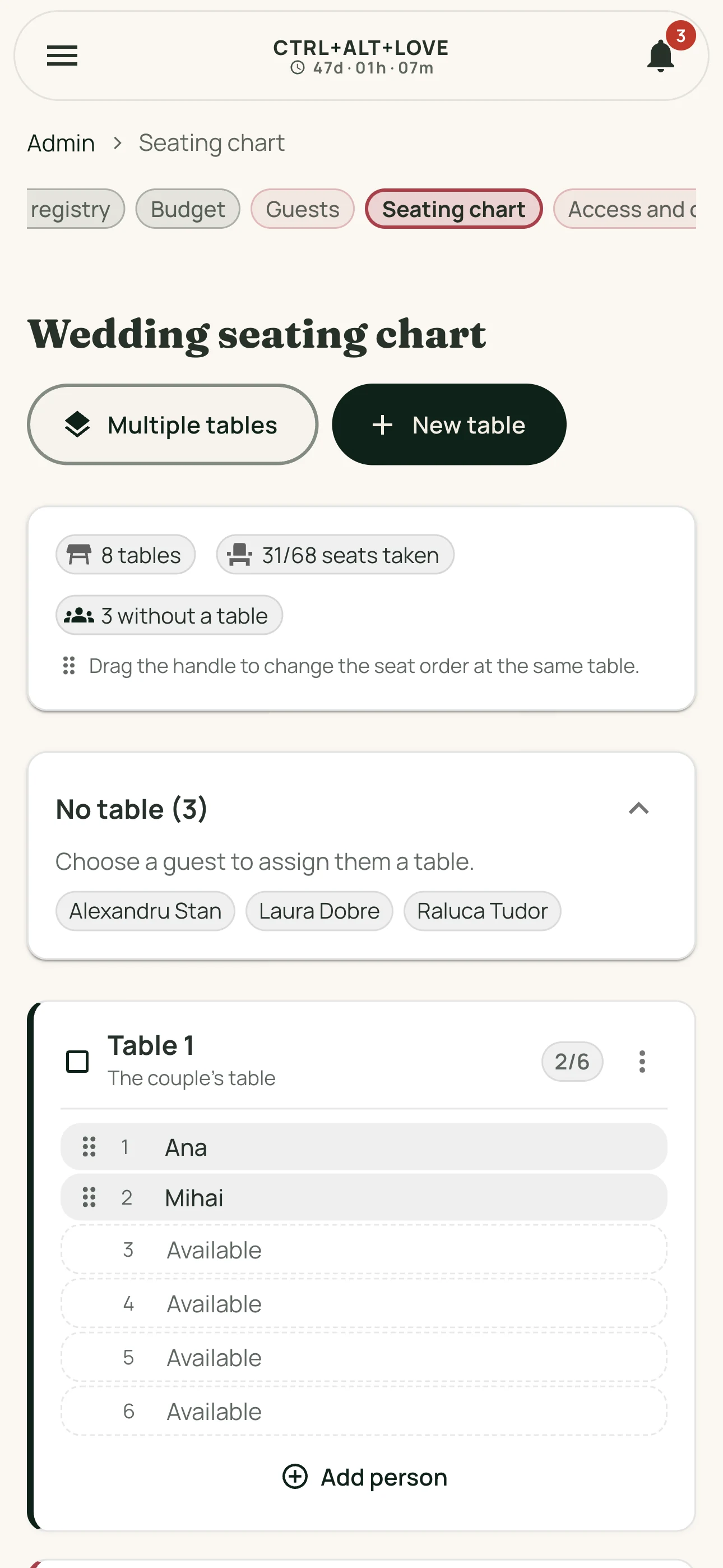
Keep families together
When you seat a guest who's bringing others, the app offers to seat the whole group at once and checks that the table has enough room. No one gets separated by accident.
Want a children's table? You can seat additional guests individually, wherever works best.
Always know who still needs a seat.
Guests without a table stay visible. Those who declined won't appear in the list of people to seat. If they already have a seat, you decide when to release it.
- Add people without accounts by entering their names.
- Each guest can see their table and seat in the app.
- Send announcements to one or more tables, with push notifications for guests who've enabled them.
How it works
- Add your tables and the number of seats at each.
- Place confirmed guests, one family at a time.
- Move and adjust seats whenever you need to, even on the wedding day.
- Guests can find their own table in the app.
Frequently asked questions
Can we move an entire family at once?
Yes. When you move the main guest, the app offers to move the people coming with them. It tells you beforehand if the new table doesn't have enough seats.
What happens if someone cancels?
If they haven't been seated yet, they disappear from the list of people to seat. If they already have a seat, it stays assigned until you release it in the seating chart.
Can we seat people without an account?
Yes. Enter their name directly on a seat. Later, you can add an email address from the seat options to create their guest profile while keeping the same seating assignment.
How many tables can we create?
As many as you need. Create several at once with automatic numbering, then rename any special tables.